
Why AI Has Become Essential for Modern Developers
Artificial Intelligence is making software development faster and more efficient. In this guide, you will learn what AI is, why it is important for developers, and how it can be used for coding, debugging, learning, and software development. You will also discover the top AI tools, their benefits, limitations, impact on developer careers, and the best practices for using AI effectively.
Why Has AI Become Essential for Every Developer?
Over the last few years, the software development industry has changed a lot. One of the biggest changes is the rapid growth of Artificial Intelligence (AI). In the past, developers had to read long documentation, search forums for solutions, and switch between many different resources to build a feature or fix a bug. Today, AI has made this process much faster and more organized. However, the real purpose of AI is not just to generate code. It helps developers make better decisions, reduce repetitive tasks, and improve productivity.
From my practical development experience, AI has been most useful for project planning, debugging, understanding code, and writing documentation. Whether I need to plan the architecture of a new Laravel project or find the root cause of a complex bug, AI provides a good starting point and useful direction. This helps speed up the development process. However, the final implementation, security, and code quality are always the developer's responsibility.
Today, software companies give more value to developers who know how to use AI tools in a smart and responsible way. The reason is simple. AI reduces repetitive and time-consuming tasks, allowing developers to spend more time on business logic, performance optimization, and improving the user experience. That is why AI is not seen as a shortcut but as a productivity tool.
There is one important thing every developer should remember. AI is not a replacement for programming knowledge. If your fundamentals, logical thinking, and problem-solving skills are not strong, it will be difficult to understand AI suggestions and use them correctly. A successful developer is someone who combines AI with their own knowledge and experience.
In this guide, we will learn step by step why AI has become so important for developers, how it improves the development workflow, which AI tools are the most useful, what their limitations are, and how you can use them effectively to improve your coding skills and take your career to the next level.
What Is Artificial Intelligence (AI)?
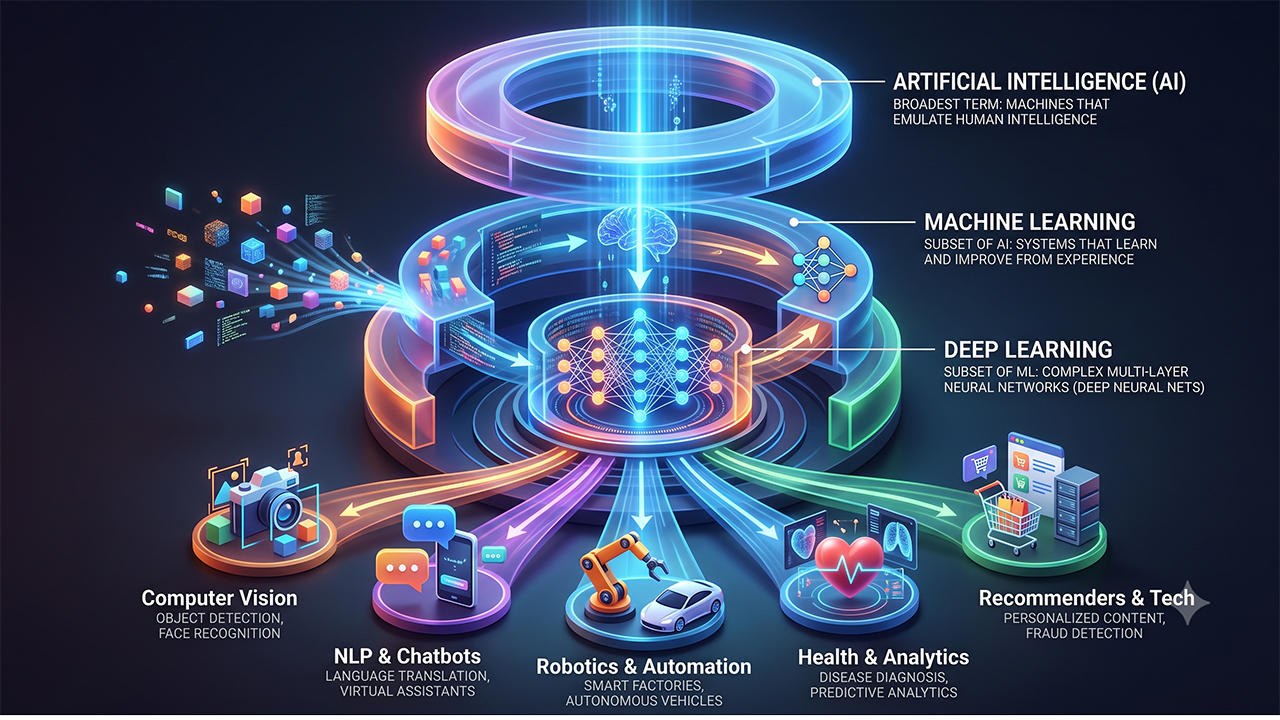
Artificial Intelligence (AI) has become an important part of almost every industry. Whether it is software development, digital marketing, healthcare, or education, the use of AI is growing rapidly. Many people use AI tools every day, but they do not clearly understand how AI actually works. Getting answers from a chatbot or generating code with one click is only a small part of what AI can do. Behind the scenes, AI uses advanced algorithms and large amounts of data to identify patterns and generate intelligent responses.
In simple terms, Artificial Intelligence (AI) is a technology that allows computers to analyze data, recognize patterns, and provide useful suggestions or make decisions based on that information. AI does not have human emotions or common sense, but when it receives clear instructions and the right context, it can perform many complex tasks very efficiently.
In software development, AI is much more than a code generation tool. It helps developers with project planning, database design, debugging, code optimization, documentation, and learning. For example, if you are building an authentication system in Laravel, AI can suggest implementation ideas, validation methods, and best practices. However, the security, business logic, and final implementation of the project are always the developer's responsibility.
This is why AI should be viewed as an intelligent assistant, not a replacement for developers. The better you define the problem and write clear prompts, the more useful the AI response will be. To use AI effectively, you should not only know how to write prompts but also how to analyze, verify, and customize the output according to your project. This approach helps developers work faster while also becoming smarter.

How Does AI Make Coding and Development Faster?
Many people believe that the main purpose of AI is simply to generate code. However, in real software development, its value goes far beyond that. Professional developers spend more time understanding project requirements, planning the architecture, debugging issues, and choosing the best solution than they do writing code. AI simplifies these time-consuming tasks, making the entire development process faster and more efficient.
For example, imagine you are building a Laravel project with features such as authentication, a dashboard, file uploads, and API integration. In a traditional workflow, you would need to read documentation, search for examples, and compare different solutions. With AI, you can describe your project requirements and receive implementation ideas, folder structure suggestions, validation strategies, and best practices within seconds. This gives you a clear direction and reduces unnecessary trial and error.
Another major advantage of AI is in debugging. When an error occurs, developers often have to switch between logs, documentation, and online forums to find the solution. AI can explain error messages, identify possible causes, and suggest logical troubleshooting steps. This makes the debugging process more organized and saves valuable development time.
From my experience working on Laravel projects, I have found that AI is especially helpful for repetitive tasks such as creating CRUD operations, setting up form validation, writing API documentation, and organizing basic boilerplate code. However, this does not mean that you should use AI-generated code without reviewing it. Every project has different requirements, so testing, optimizing, and checking the security of the code will always remain the developer's responsibility.
In the end, AI does not replace developers. Instead, it reduces repetitive work and allows developers to focus on more important areas such as software architecture, performance optimization, and user experience. That is why AI has become an essential part of the modern software development workflow.
How Has AI Made Learning and Skill Development Easier?
Software development is a field where learning never stops. Every year, new frameworks, libraries, programming languages, and tools are introduced. That is why knowing how to code is not enough. Developers also need to keep learning new skills throughout their careers. In the past, learning a new topic meant reading documentation, watching YouTube tutorials, and collecting information from different websites.
This process often took a lot of time. Today, AI has made learning faster, more interactive, and more practical.Whenever I explore a new technology, I do not focus only on memorizing syntax or commands. I first try to understand its real-world use cases and how it can be applied in actual projects. At this stage, AI works like a mentor. If I want to learn Docker, GraphQL, Redis, or a Laravel package,
AI can explain the concepts in simple language, suggest a learning roadmap, and answer questions with practical examples. This makes learning more focused on real implementation instead of just theory.For example, if you are learning to build a REST API for the first time, AI can explain the request and response cycle, HTTP methods, authentication, and common errors step by step. If you face a problem while implementing your API, AI can also explain the possible cause of the error and suggest a solution. However,
simply reading the answers is not enough to learn. The most effective approach is to understand the concept first, implement it yourself, and then ask AI to review your code and suggest improvements.When AI is used as a learning partner instead of a shortcut, understanding new technologies becomes much easier. It helps you learn faster, but real confidence comes from practicing the concepts yourself and applying them in real-world projects.
What Impact Does AI Have on Web, Mobile, and Software Development?
In the past, web development, mobile app development, and software development were considered separate fields. Today, modern applications combine frontend, backend, mobile apps, APIs, and cloud services to work together. Because of this, the development process has become more complex. AI has helped developers manage this complexity, and its impact can now be clearly seen across almost every area of development.
Web Development
In web development, AI improves both planning and implementation. Whether you are working with Laravel, Django, Node.js, or WordPress, developers need to handle many tasks during a project, such as routing, authentication, database design, SEO optimization, and performance improvement. AI can make development faster by providing architecture suggestions, database relationship ideas, and code optimization recommendations. This allows developers to spend less time on repetitive research and focus more on user experience and business logic.
Mobile App Development
AI is also very useful in Flutter, React Native, Android, and iOS development. It can provide suggestions for improving UI design, API integration methods, offline data handling, and performance optimization. For example, if you are building a Flutter app with a login system and REST API integration, AI can suggest better approaches for request handling, state management, and error handling. However, final testing and checking device compatibility are still the developer's responsibility.
Software Development
In enterprise-level software projects, the role of AI has become even more important. AI improves productivity in areas such as requirement analysis, documentation, code review, testing strategies, and project planning. It helps developers spend less time on repetitive tasks and focus more on architecture, security, scalability, and business requirements.
In the end, AI is not limited to a single technology. Whether you are a web developer, mobile app developer, or software engineer, AI has become an important tool that makes the development workflow smarter, faster, and more efficient.
Top AI Tools Every Developer Should Use
With the growing popularity of Artificial Intelligence, hundreds of AI tools are now available in the market. However, every tool is not useful for every developer. The goal of a professional developer is not to install more tools but to choose the right tools that improve their workflow. By using reliable AI tools for learning, coding, debugging, and research, developers can make the development process faster and more organized.
The first and most popular tool is ChatGPT. It is not only useful for generating code but also for understanding programming concepts, planning project architecture, discussing database design, and explaining complex errors. If you write clear prompts, ChatGPT can provide practical guidance like an experienced programming mentor.
Another powerful tool is GitHub Copilot. It provides real-time coding suggestions inside Visual Studio Code and other supported IDEs. It saves a lot of time by helping developers write repetitive functions, boilerplate code, and common coding patterns. However, it works best when developers already have a good understanding of programming fundamentals.
If you prefer reading detailed documentation and technical explanations, Claude is a great option. For developers who work with research and the Google ecosystem, Google Gemini is useful. Perplexity AI helps with technical research by providing the latest programming trends along with source references.
One important thing to remember is that no AI tool is perfect. Every tool has its own strengths and limitations. That is why experienced developers do not depend on a single AI tool. They choose tools based on the task and always verify the final output. AI tools improve productivity, but the responsibility for code quality and accuracy always remains with the developer.
Recommended AI Tools for Developers
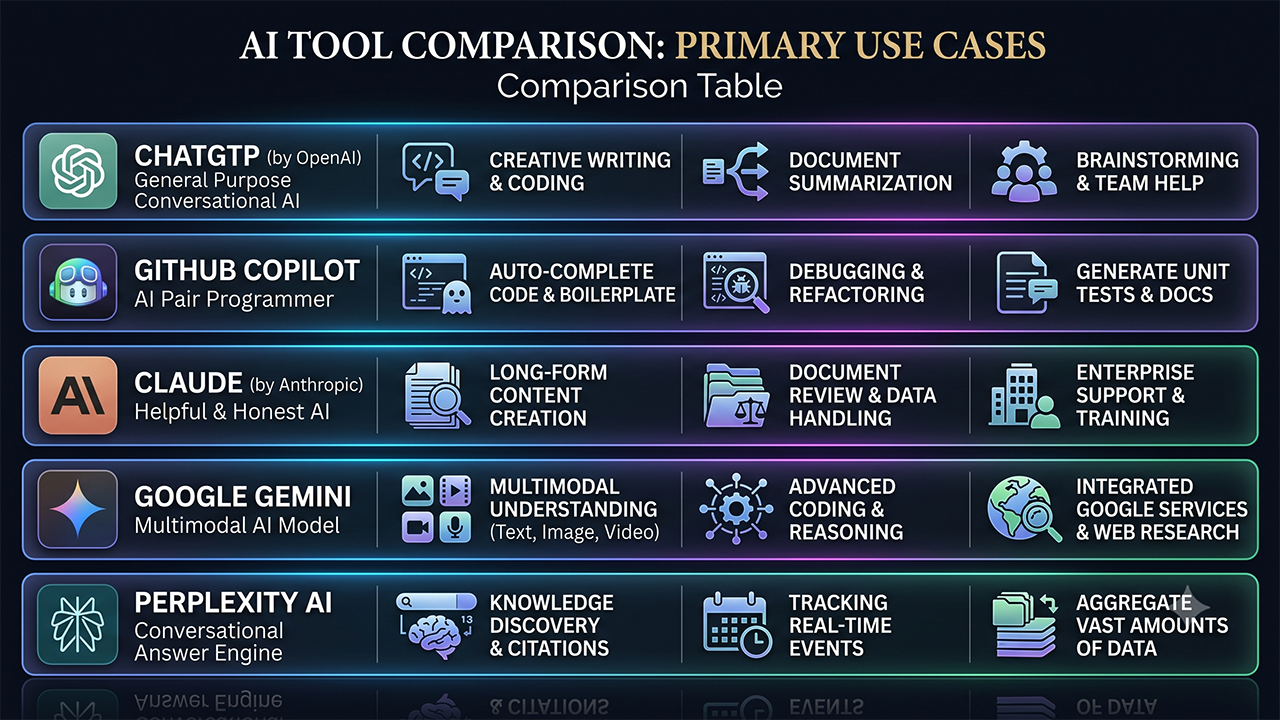
- ChatGPTLearning, debugging, architecture planning, and code explanation
- GitHub CopilotReal-time coding assistance and boilerplate code generation
- ClaudeDetailed technical explanations and documentation
- Google GeminiResearch and Google ecosystem integration
- Perplexity AILatest technical research with source references
Best AI Tools for Students to Make Money Online

Biggest Benefits of AI for Developers
Artificial Intelligence is not only being used to increase development speed, but also to improve developers' overall productivity, learning ability, and problem-solving skills. Today, from small startups to large software companies, many organizations are making AI tools a part of their development workflow. The reason is simple: AI automates repetitive tasks and allows developers to focus on areas where creativity and technical decision-making are most important.
The biggest advantage of AI is improved productivity. For example, imagine you are developing an eCommerce project that includes authentication, a payment gateway, email notifications, and an admin dashboard. AI can save a significant amount of time that would normally be spent searching documentation and creating basic implementation plans. This allows developers to focus more on business requirements and improving the user experience.
Another important benefit is better problem-solving. During development, the solution to every error cannot always be found directly in documentation or online forums. AI can explain error messages, identify possible causes, and suggest logical debugging steps. With this approach, developers can solve problems in a more structured way instead of trying random solutions.
Continuous learning is another major advantage of AI. To understand new frameworks, libraries, and technologies, AI can provide quick explanations, practical examples, and learning roadmaps. If you are confused about a concept, you can ask follow-up questions and understand it in more detail. This makes the self-learning process faster and more interactive.
Apart from this, AI also provides valuable support in tasks such as writing documentation, code review, generating testing ideas, and project planning. However, always remember that AI is an assistant, not a decision-maker. The final code quality, security, and success of a project always depend on the developer's experience and implementation skills.
Limitations and Challenges of AI
Artificial Intelligence is a powerful tool for developers, but that does not mean AI can provide a perfect solution in every situation. Many beginners start thinking of AI as a complete replacement for developers, but the reality is very different. AI provides suggestions and guidance, but the final decisions and implementation are always the developer's responsibility. That is why understanding the limitations of AI is just as important as understanding its benefits.
The first major limitation is accuracy. Sometimes, AI can provide outdated information, incomplete code, or solutions that do not match the actual project requirements. If a developer uses AI-generated code without verification, it can create bugs or performance issues in the project. Therefore, AI-generated output should always be tested and reviewed before implementation.
The second important challenge is security. When working with authentication systems, payment systems, user data, and sensitive information, blindly trusting AI suggestions can be risky. The generated code may not always follow proper validation, authorization, or security best practices. This is why professional developers manually review AI-generated code and improve it whenever necessary.
Another important challenge is over-dependency. If developers depend on AI for every small problem, their logical thinking and problem-solving skills may become weaker over time. The real purpose of programming is not only to write code but also to analyze problems and design efficient solutions. Use AI to improve your learning and productivity,
but never stop thinking independently or developing the habit of reading documentation.In the end, AI is an excellent assistant, but a successful developer is someone who balances technical knowledge, practical experience, and AI capabilities effectively. This balanced approach is the key to long-term career growth and building high-quality software.
Will AI Replace Developers' Jobs?
With the growing use of Artificial Intelligence, one question is being asked again and again: "Will AI replace developers' jobs in the future?" There are different opinions on this topic across social media and technology forums. Some people believe that AI will completely automate coding, while many experts believe that AI is designed to improve developer productivity, not replace developers. The reality lies somewhere in between.
Software development is not limited to just writing code. A successful project requires understanding client requirements, designing business logic, planning system architecture, implementing security, and considering future scalability. AI can provide useful suggestions in these areas, but final decisions and implementation still require human experience and critical thinking.
For example, imagine a company wants to develop a banking application, hospital management system, or a large-scale eCommerce platform. In such projects, security, legal compliance, and business requirements are extremely important. AI can make the development process faster, but developers still need to handle the risks of incorrect implementation. This is why the demand for experienced developers will continue in the future.
However, one thing will definitely change. Companies will prefer developers who know how to work efficiently with AI tools. Repetitive coding tasks and basic development work will gradually become more automated, while developers will focus more on areas such as architecture design, performance optimization, cloud technologies, cybersecurity, and problem-solving. Instead of competing with AI, learning how to work with it is the smarter approach.
The future belongs to developers who continue to adopt new tools and technologies. Strong programming fundamentals, practical project experience, and responsible use of AI together can help developers achieve long-term success and better career opportunities.
Best Practices for Using AI Effectively
Simply opening an AI tool and writing a prompt does not mean you are using AI effectively. You get real benefits when you make AI a smart part of your development workflow. Today, many developers can generate code with AI, but they do not fully understand it. Because of this, they face problems later during debugging, maintenance, and project customization. If you want to become a skilled developer in the long term, you should learn to use AI not as a shortcut, but as a learning and productivity partner.
The first best practice is to write clear and detailed prompts. The more context you provide to AI, the more accurate the response will be. Instead of simply writing "Create a login system," mention the framework, version, authentication method, and project requirements. This helps AI provide project-specific guidance instead of a generic answer.
The second important practice is to verify AI-generated output. Whether it is code, documentation, or an architecture suggestion, you should never use it directly in a production environment without checking it. Testing, security reviews, and performance optimization should always be part of every professional developer's workflow.
The third best practice is to ask AI for explanations, not just answers. When AI provides a solution, ask why it selected that approach, what alternatives are available, and what limitations the solution may have. This improves both your technical understanding and problem-solving skills.
Finally, never stop reading documentation and practicing coding yourself. AI can make learning faster, but real confidence comes when you build projects, learn from mistakes, and continuously improve your skills. The combination of strong fundamentals and smart AI usage is what defines a successful developer.
Become a Smart Developer with AI, Not Just a Faster Developer
Artificial Intelligence has made software development much faster and more efficient than before. Today, developers can complete many tasks such as project planning, coding, debugging, documentation, and learning in less time with the help of AI. However, the biggest benefits of AI can only be achieved when it is used together with strong programming knowledge and practical experience. Depending completely on AI is not a long-term solution.
In this article, we discussed everything from the basic concepts of AI to its role in development workflows, learning, top AI tools, benefits, limitations, and future career opportunities. If you are a beginner, first focus on building strong programming fundamentals and then gradually make AI tools a part of your daily workflow. If you are already a professional developer, use AI to automate repetitive tasks and improve productivity, but always keep control over the final implementation and code quality.
Technology is changing every year, and AI is also continuously evolving. That is why a successful developer will be the one who adopts new tools, keeps learning, and regularly updates their technical skills. Remember, companies do not only hire developers who use AI, they hire developers who can deliver better solutions with the help of AI.
In the end, always remember one thing: AI is not your competitor, it is a powerful assistant. Once you learn how to use it smartly, you can not only improve your productivity but also take your learning speed and career growth to the next level.
Frequently Asked Questions (FAQs)
1. What is Artificial Intelligence (AI) in software development?
Artificial Intelligence (AI) helps developers automate repetitive tasks, understand code, debug errors, generate documentation, and improve productivity. It works as an intelligent assistant instead of replacing developers.
2. Which AI tool is best for developers?
Popular AI tools for developers include ChatGPT, GitHub Copilot, Claude, Google Gemini, and Perplexity AI. The best tool depends on your workflow, project requirements, and personal preferences.
3. Can AI replace software developers?
No. AI can automate repetitive tasks and provide useful suggestions, but areas like software architecture, business logic, security decisions, and understanding client requirements still require human expertise.
4. Is AI-generated code safe?
Not always. Developers should carefully review, test, and optimize AI-generated code before using it in a production environment.
5. Is ChatGPT good for learning programming?
Yes. ChatGPT can help explain programming concepts, provide practical examples, review code, and solve coding problems. However, regular coding practice and hands-on experience are still essential.
6. Should beginners use AI?
Yes, but AI should be used as a learning assistant. Beginners should first understand programming concepts and then practice implementing solutions independently.
7. What are the biggest benefits of AI for developers?
AI improves productivity, speeds up debugging, makes learning easier, helps with documentation, and allows developers to focus on solving more complex problems.
8. What are the limitations of AI?
AI can sometimes generate incorrect or outdated code, misunderstand project requirements, and cannot replace human decision-making, creativity, or real-world development experience.
9. How can developers use AI effectively?
Developers should write clear prompts, verify AI responses, test generated code, read official documentation, and continue improving their programming fundamentals.
10. Which programming languages work best with AI?
AI supports almost every major programming language, including PHP, JavaScript, Python, Java, C#, Go, Rust, Laravel, React, Node.js, and many more.
Elementor New Features 2026: Everything You Need to Know
How to Build a Strong Freelance Portfolio
WordPress + AI Mastery: Build Websites Faster with AI Tools (Hindi Course)